Short answer
Disconnect the machine from the power supply and put the carrier in the mid position, release the strain relief at both ends and open the crossbars over the entire length. Remove the old cable, lay a new cable in the same compartment in one piece, straight and without torsion, secure it on both sides and first let the machine make one full stroke slowly.
You replace a cable in a cable carrier not by pulling the new cable through the carrier along with the old one. You open the carrier, remove the old cable and lay the new one in straight and without torsion, in the same compartment. Then you secure it at both ends and first let the machine make one full stroke slowly. That way the new cable lasts as long as it should.
This article is intended for the fitter who has to replace a broken cable, and for the engineer who wants to know where things can go wrong. If you want to rebuild a complete carrier, read assembling a cable carrier. If you doubt whether the carrier itself is still good, first look at repairing or replacing a cable carrier.
Why did the old cable fail?
Ask that question before you order the new cable. A cable that breaks in a cable carrier has rarely simply worn out. Usually it lies too tight, bends too sharply, is not properly secured or is a cable that is not made to move. If you replace it with exactly the same cable in exactly the same way, the same break will return.
So when removing the old cable, look at where the damage is:
- Break in the bend: the radius of the carrier is probably too small for this cable, or the cable is not suitable for moving use.
- Break or chafing marks close to one end: the strain relief was missing, was loose or pinched the sheath.
- Cable twisted into a spiral: it was laid in with torsion or was not secured at both ends.
- Sheath worn along its length: the cable lay against other cables or against the wall and had too little room.
Which cable should you choose as a replacement?
Preferably use the same cable as the one that was fitted, provided it was suitable. If the old cable was not designed for use in a cable carrier, this is the moment to put that right. Check these three points for every replacement:
- (01)Suitable for continuous movement: the manufacturer specifies a minimum bending radius for moving use and a number of movement cycles. A cable that merely feels flexible is not necessarily suitable. Read more in which cables in a cable carrier.
- (02)Bending radius suits the carrier: the minimum bending radius for moving use from the datasheet must not be larger than the bending radius of the carrier. With the bending radius calculator you can check this in a few seconds.
- (03)Diameter fits the compartment: the new cable must lie in its compartment with clearance. As a rule of thumb we use an inner height of at least 1.1 times the cable diameter. If the new cable is thicker than the old one, check whether the layout still works.
If you are looking for a replacement by cores, cross-section, shielding, travel length and cycles, use the Kabelfinder. It shows the lightest class that is sufficient. You can find all series under flexible cables.
Calculate it yourselfCable finderThe right flexible cable for your cable carrierOpen the cable finderHow long should the new cable be?
The cable runs from the connection on the machine side, through the carrier, to the connection on the fixed side. Measure the old cable or take the length from the machine documentation. Inside the carrier, give the cable a slight extra length, in the order of 1 to 2%, so that it lies freely in the bend and is not taut between the fixed point and the driver.
Always use a cable in one piece. A joint or splice in the moving section is a weak point that bends with every stroke. If the old cable was ever extended with an intermediate piece, get rid of it during this replacement.
Replacing a cable in a cable carrier: how to go about it
Follow these steps in this order. Most problems after a replacement come from a step that was skipped.
- (01)Make the machine safe: isolate the machine from the power supply and secure it against being switched on, following your company's procedure. Also release the pressure from hoses that run in the same carrier if you need to reach them.
- (02)Carrier in the middle position: if possible, put the axis in the middle position. The largest part of the carrier then lies straight and is easiest to access.
- (03)Record the layout: take a photo of which cable lies in which compartment and how the dividers are positioned. This saves searching when you put the cables back.
- (04)Release the strain relief: release the cable at the fixed point and at the driver. Disconnect it from the connection on both sides.
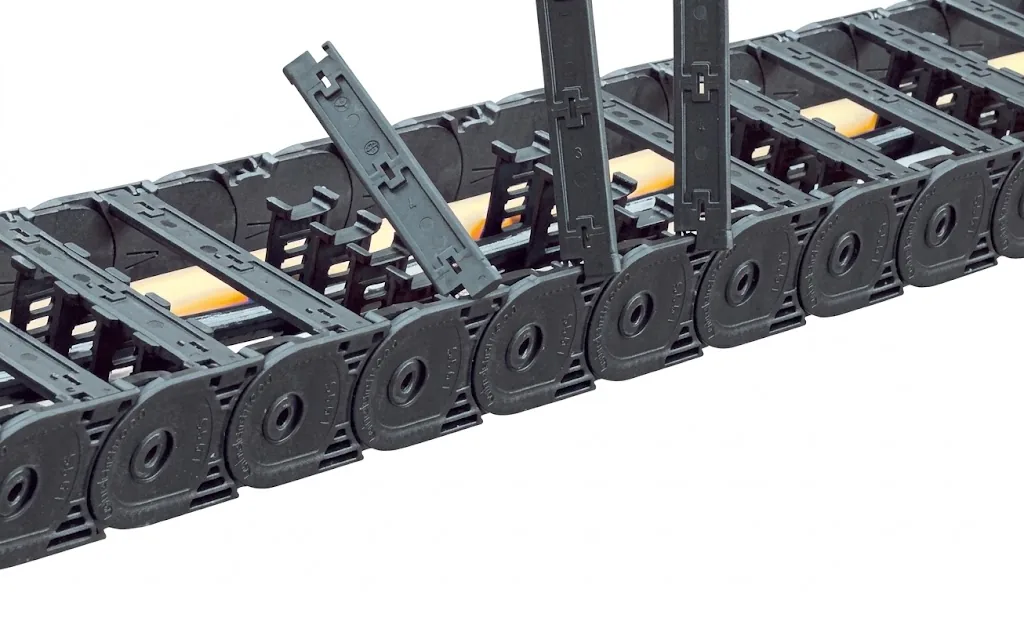
- (05)Open the carrier: open the crossbars over the entire length, on the side where this is possible for your type (see the next section).
- (06)Remove the old cable: lift the cable out of its compartment. Immediately inspect the neighbouring cables, the dividers and the inside of the links. Sharp edges or loose parts will otherwise cause the next break.
- (07)Prepare the new cable: unroll the cable from the reel without pulling it off, and let it relax stretched out before it goes into the carrier. A line on the sheath helps to see whether it is twisted.
- (08)Lay it in: lay the cable straight in the same compartment, from start to finish, without crossing and without torsion. It must not press against other cables or against the wall.
- (09)Secure it: fix the cable at both ends with strain relief, outside the moving section. Clamp it without crushing the sheath.
- (10)Close the carrier and do a test run: close all crossbars, connect the cable and first let the machine make a full stroke at low speed. Check that the cable stays in place and does not creep out of the carrier anywhere.
How do you open the cable carrier?
How you open a cable carrier depends on the series and the type. With many series you open the crossbars on the inside or the outside of the bend, sometimes on both sides. With the QuickTrax® you press cables into elastic lamellas instead of opening crossbars. An enclosed carrier, such as the TKA, has a cover that you open to reach the cables.
There are also types that cannot be opened. With these, crossbars have to be removed or more dismantling is needed. Which version your type has can be seen in the type data on the series page, and the assembly instructions are under downloads. If you do not know the type, send a photo of the side plate. If crossbars, dividers or clamps are missing, or a part is broken, order them via parts for cable carriers.
What do you check after the replacement?
After the test run at low speed, walk along the carrier once more before returning to production speed:
- The new cable lies straight in its compartment and is not pulled taut in the bend.
- It does not creep out of the carrier at the fixed point and the driver.
- All crossbars or covers are closed and locked.
- The carrier bends evenly and does not touch the machine or the channel anywhere.
- The neighbouring cables are still in place.
Check again after the first few days. If the cable still twists into a spiral, it was laid in twisted or is not properly fixed on one side. What to do then is described in cables twisting in the carrier. For a regular check of the whole carrier, use the Carrier check.
Do you replace one cable or all cables?
If one cable breaks, the other cables in the same carrier are just as old and have made the same number of strokes. That does not mean they are worn out too, but it does make sense to inspect them carefully when you open the carrier. If you see sheath damage on several cables, or there is already wear on the carrier itself, it is often more economical to do everything in one stoppage than to open it again within a few months.
If you need to change the layout, for example because a thicker cable is being added, first draw it in ChainLogic. There you can see immediately whether the cables fit, where the dividers go and how full the carrier will be.
Do you not want to do the replacement yourself, or do you want to know in one go the condition of all carriers in an installation? Joep and his colleagues inspect the carriers, record the condition of each carrier and schedule the replacement at a time that suits you. A carrier can also come complete with new cables, assembled in Ruurlo.
Frequently asked questions
Can I pull a new cable through the cable carrier along with the old one?
Preferably not. The cable twists and rubs on the way, and often ends up twisted or crossed in the carrier. Open the crossbars and lay the new cable in straight.
May I extend a cable in a cable carrier with a joint?
No, not in the moving section. A cable in a cable carrier should be made of one piece. A joint bends with every stroke and becomes the next break.
How much extra length do I give the cable in the cable carrier?
A slight extra length, in the order of 1 to 2%, so that the cable lies freely in the bend and is not taut between the fixed point and the driver.
Why does the new cable break in the same place?
Then the cause has not been removed. Usually the radius is too small, the strain relief is missing or the cable is too tight. Have us check the carrier and the cable package free of charge.
Next step
Calculate it yourself or browse the range. We check your result free of charge.
Series on this topic
Question about this topic?
Ask Joep directly
RMO Specialist at Wisman Techniek